
MPBOU MPOnline Portal Admission Process and Registration
Part of MPBOU Admission: Bhoj Open University Admission 2026: MPBOU Courses, Eligibility and Fees
- MPBOU distance learning admission forms are submitted online through the MPOnline portal.
- Regional and study centres verify eligibility and provide online approval for MPBOU admission forms.
- MPBOU generates enrollment and roll numbers after document approval and sends them via SMS.
- Enrolled MPBOU students can register for the Student Information System on MPOnline for Rs. 20.
At a glance
| Portal URL | mpbou.mponline.gov.in |
|---|---|
| SIS Registration Fee | Rs. 20 |
| Admission Contact Email | admission.mpbou@gmail.com |
| Technical Helpline Phone | 0755-6720200 |
| University Contact Phone | 0755-2492090 |
| Academic Session Submitted | 2026-27 (January-February) |
MPBOU MPOnline distance admission: 2026-27 January-February session
MPBOU accepts admission applications for distance learning programmes online through the official MPOnline portal.
MPBOU has not published specific course fee structures or admission last dates on its portal for the 2026-27 January-February session as of 16 October 2026.
- Open the MPBOU MPOnline portal to view active university notifications and available admission forms.
- Select the desired programme admission form link and enter required student personal and educational details.
- Upload necessary eligibility certificates and submit the online application form on the portal.
MPBOU admission verification: centre approval and enrollment generation
MPBOU regional and study centres review submitted admission forms and verify uploaded eligibility documents online.
MPBOU generates enrollment numbers and roll numbers after successful centre approval and sends them to students by SMS. If documents do not fulfill eligibility criteria, MPBOU cancels the admission form.
MPBOU SIS registration: Rs. 20 portal fee
MPBOU provides a Student Information System account facility for all enrolled distance learning students on the MPOnline portal.
Enrolled students pay a portal fee of Rs. 20 to complete their registration.
- Visit the MPBOU MPOnline login portal and navigate to the Student Information System registration link.
- Enter your assigned MPBOU Enrollment Number and Date of Birth to create your student database profile.
- Pay the required Rs. 20 portal fee online to complete SIS registration.
Other MPBOU services students check
MPBOU helpline support: email and phone channels
MPBOU provides dedicated contact channels for administrative, admission and portal technical issues.
MPBOU MPOnline Contact Channels
| Issue Type | Contact Channel | Details |
|---|---|---|
| Admission Queries | admission.mpbou@gmail.com | |
| Technical Portal Issues | Helpline Phone | 0755-6720200 |
| University Administrative Issues | Phone | 0755-2492090 |
| Online Technical Ticket | Portal Link | Submit ticket via MPOnline help desk ticket portal |
Useful MPBOU pages
| What you can do | Official page |
|---|---|
| Submit MPBOU online admission application forms | mpbou.mponline.gov.in ↗ |
| Submit technical helpdesk tickets for MPOnline | helpdesk.mponline.gov.in ↗ |
| Access MPBOU Student Information System login | mpbou.mponline.gov.in ↗ |
MPBOU Notifications and PDFs
- MPBOU DEB Distance Education Application Details 2026-27 PDF — UGC-DEB application submitted for MPBOU ODL programmes 2026-27
MPBOU Questions, Answered
How do I apply for MPBOU distance education admission online?
MPBOU distance education admission forms for the 2026-27 January-February session are submitted online via the official MPOnline portal. Applicants must open mpbou.mponline.gov.in/portal, select their desired programme, and accurately fill in all personal and educational details. Subsequently, they need to upload necessary eligibility certificates and submit the application for verification by regional centres. If the submission fails, ensure all mandatory fields are completed and documents are correctly uploaded.
How do MPBOU students receive their enrollment number after applying?
MPBOU students receive their enrollment and roll numbers via SMS message once regional centres successfully verify their eligibility documents online. This automatic generation occurs only after the online approval process is completed by the study centres. If the submitted documents do not meet the eligibility criteria, MPBOU will cancel the admission form. Students can track the status of their application on the MPBOU MPOnline portal.
What is the fee for MPBOU Student Information System (SIS) registration?
MPBOU charges a portal registration fee of Rs. 20 for Student Information System registration. All enrolled students register using their enrollment number and date of birth to create a profile database. This service allows students to manage university records online. Registration is completed on the MPBOU MPOnline login portal.
Where can students log technical issues regarding the MPBOU MPOnline portal?
MPBOU technical portal issues are reported by calling the helpline at 0755-6720200 or submitting an online ticket. Students submit tickets through the MPOnline support system for payment or form submission errors. For admission specific queries, students email admission.mpbou@gmail.com. Online tickets are raised at the MPOnline help desk ticket portal.
What happens if an applicant does not meet eligibility criteria during MPBOU verification?
If an applicant does not meet the eligibility criteria during verification, MPBOU will cancel their admission form. Regional and study centres meticulously review all uploaded documents to ensure they fulfill the programme’s requirements before granting online approval. Applicants are solely responsible for providing accurate and complete documents that match the stated eligibility criteria. The university notifies students about their form status, including cancellations, via SMS message.
Can MPBOU students apply for official documents through MPOnline?
Enrolled MPBOU students can apply online for degree, diploma, migration, and provisional certificates through the MPOnline portal. This facility is accessible to all enrolled students on mpbou.mponline.gov.in during the 2026-27 academic session. Students can also download official fee receipts via the MPOnline Mobile App by selecting the MP Mobile University link. If form submission or payment fails, submit an online ticket at helpdesk.mponline.gov.in/ticket or contact the helpline at 0755-6720200.
Where can I find the eligibility criteria for MPBOU distance learning programmes?
Eligibility criteria for MPBOU distance learning programmes are published on the official MPOnline portal and university notifications. Applicants must check specific requirements on mpbou.mponline.gov.in/portal before submitting admission forms for the 2026-27 January-February session. Regional and study centres verify all uploaded eligibility certificates online prior to granting admission approval and generating enrollment numbers. If your application is cancelled due to document discrepancy, contact admission support at admission.mpbou@gmail.com or call 0755-2492090.
How can I check my MPBOU admission application status online?
Students can check their MPBOU admission application status online directly through the MPBOU MPOnline portal. After submitting the application, the portal provides a facility to track the progress of your form. This allows you to monitor whether your documents have been verified by regional centres or if your enrollment number has been generated.
How can students submit an online grievance to MPBOU?
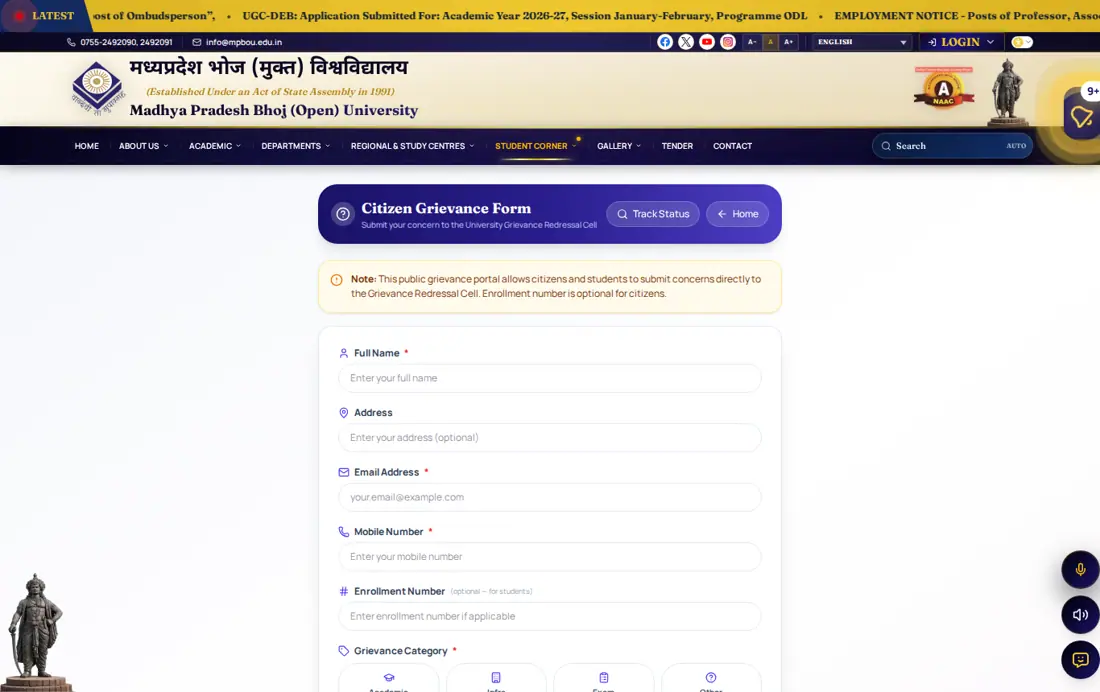
MPBOU provides an online Citizen Grievance Form on its official portal to submit concerns directly to the University Grievance Redressal Cell. Students select grievance categories such as Academic, Exam, Infra, or Other and submit their details along with a description of the issue. Providing an MPBOU enrollment number is optional for citizens but helps track student issues for the 2026-27 academic year. If your grievance remains unresolved, contact university administrative support by calling 0755-2492090 or emailing info@mpbou.edu.in.
What details are required to complete MPBOU Student Information System registration?
MPBOU Student Information System registration requires an assigned enrollment number, date of birth, and a portal fee payment of Rs. 20. Enrolled students must access mpbou.mponline.gov.in/Portal/Login.aspx to enter these details and build their student database profile for the 2026-27 session. Completing this online registration enables students to manage academic records and university services digitally. If the system rejects your credentials or payment fails, submit an online ticket at helpdesk.mponline.gov.in/ticket or phone 0755-6720200.
How can MPBOU students download online payment receipts on a mobile phone?
MPBOU students can download online fee receipts using the MPOnline Mobile App available on the Google Play Store. Users must open the application, select the MP Mobile category, and navigate through the University link to locate their transaction records. This mobile service helps students store official payment receipts for distance learning services during the 2026-27 academic session. If payment records do not display or download attempts fail, log an online complaint ticket at helpdesk.mponline.gov.in/ticket or call 0755-6720200.
How can students apply for name correction on the MPBOU MPOnline portal?
MPBOU provides an online service for student name correction on official records through the MPOnline portal. Enrolled students must log into mpbou.mponline.gov.in to submit a name correction request along with supporting identity documents. The university verifies the submitted records before updating student details across enrollment and mark sheet databases for the 2026-27 academic session. If payment fails or technical errors occur during form submission, log a ticket at helpdesk.mponline.gov.in/ticket or call helpline 0755-6720200.
What is the minimum attendance requirement for MPBOU ODL programme term-end examinations?
MPBOU mandates a minimum of 75% attendance in all academic activities prior to appearing in term-end examinations. Students enrolled in Open and Distance Learning (ODL) programmes for the 2026-27 January-February session must complete required contact classes and practicals at allocated study centres. Fulfilling this 75% attendance condition is mandatory to qualify for final term-end examination hall tickets. If attendance records show discrepancies or eligibility issues arise, contact admission support by emailing admission.mpbou@gmail.com or calling 0755-2492090.
What is the territorial jurisdiction for MPBOU Open and Distance Learning programmes?
MPBOU offers its Open and Distance Learning (ODL) programmes strictly within the territorial jurisdiction of Madhya Pradesh state as per UGC Regulations 2020. For the 2026-27 January-February session, all examination centres, learner support centres, and academic facilities operate within state boundaries. Applicants must ensure their study location falls within Madhya Pradesh during online form submission on mpbou.mponline.gov.in/portal. For territorial or study centre eligibility queries, email info@mpbou.edu.in or call 0755-2492090.
Where is the main administrative campus of MPBOU located?
MPBOU is located at Raja Bhoj Marg, Kolar Road, Bhopal, Madhya Pradesh, pincode 462016. Students submitting physical application documents, grievance forms, or official postal correspondence for the 2026-27 academic session must direct their communications to this main administrative campus. General institutional inquiries can be sent to info@mpbou.edu.in or made by calling 0755-2492090. For technical MPOnline portal errors, raise an online ticket at helpdesk.mponline.gov.in/ticket or phone 0755-6720200.
What should applicants do if an online fee payment fails during MPBOU form submission?
If an online fee payment fails during MPBOU admission form submission, applicants must log a complaint ticket on the MPOnline helpdesk portal at helpdesk.mponline.gov.in/ticket. Users should select the BHOJ service category, enter their application reference number or transaction ID, and choose Payment Failure as the issue type for the 2026-27 session. After completing OTP verification and submitting the details, technical support reviews and resolves the transaction error. For urgent assistance, students can contact the helpline at 0755-6720200.
More on Admission
- MPBOU MPOnline Admission Forms, Verification Steps, and Fees
- Bhoj Open University Admission 2026: MPBOU Courses, Eligibility and Fees
- Bhoj University Admission Last Date 2026 for MPBOU Academic Sessions
- MPBOU Fee Structure: Bhoj University Courses and Fees List
- MPBOU Student Support and MP Bhoj Helpline Number Details
- MPBOU Bhoj University Entrance Exam Details, Syllabus and Admission Process