
MPBOU Revaluation Result Released for MBA Lateral Entry Exam 2026
At a glance
| University | Madhya Pradesh Bhoj (Open) University |
|---|---|
| Exam Name | MBA (Lateral Entry) Examination 2025 (January–December) |
| Notification Date | October 09, 2026 |
| Reference Number | 9545/P.M./MPBhojOpenUniversity/2026 |
| Application Mode | M.P. Online |
MPBOU MBA (Lateral Entry) Revaluation Result 2025: Highlights
The university completed the revaluation process for theoretical answer sheets based on applications submitted online. Below are the key details of the declared result at a glance:
MPBOU MBA (Lateral Entry) Revaluation Result Highlights
| Particulars | Details |
|---|---|
| University | Madhya Pradesh Bhoj (Open) University (MPBOU), Bhopal |
| Programme | Master Of Business Administration (Lateral Entry) |
| Examination Session | 2025 (January–December) |
| Release Date | October 09, 2026 |
| Maximum Papers Revalued | Up to 02 theoretical question papers |
| Official Document | MBA Lateral Entry Revaluation Result PDF |
Details Mentioned in the Revaluation Notice
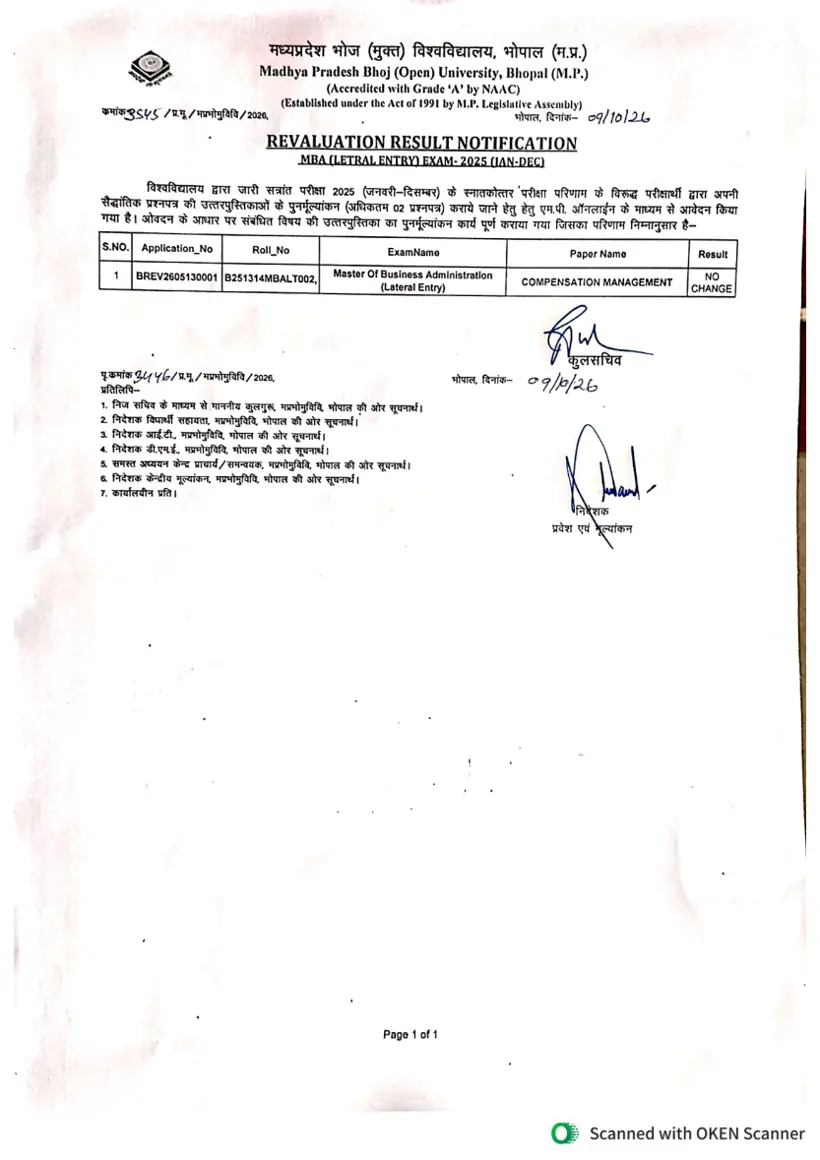
According to the official notification issued by the Registrar under Reference No. 9545/P.M./MPBhojOpenUniversity/2026, the revaluation evaluation for the MBA (Lateral Entry) examination has been concluded. The notice details candidate-wise outcomes as published below:
MPBOU MBA (Lateral Entry) Revaluation Result Details
| S.No. | Application No | Roll No | Exam Name | Paper Name | Result Status |
|---|---|---|---|---|---|
| 1 | BREV2605130001 | B251314MBALT002 | Master Of Business Administration (Lateral Entry) | COMPENSATION MANAGEMENT | NO CHANGE |
How to Submit a Grievance or Access Support
Candidates can view published result sheets directly on the MPBOU Results Page. If students encounter any discrepancies or require grievance support, MPBOU provides a direct online portal to register concerns.
- Visit the official MPBOU Grievance Portal.
- Fill in mandatory details including Full Name, Email Address, and Mobile Number.
- Optionally enter your Address and Enrollment Number.
- Select the relevant Grievance Category (Academic, Infra, Exam, or Other).
- Enter the Grievance Subject/Issue and write a description (up to 1000 characters).
- Click ‘Submit Grievance’ to log your request with the Grievance Redressal Cell.
Other MPBOU services students check
Technical and Portal Assistance
For issues relating to technical errors, payments, or online applications on the M.P. Online system, students can submit an online ticket via the MPOnline Help Desk. Additionally, technical support is reachable by phone at 0755-6720200, while university administrative queries can be directed to 0755-2492090 or via email at admission.mpbou@gmail.com.
Useful MPBOU pages
| What you can do | Official page |
|---|---|
| browse and view MPBOU results | mpbou.edu.in ↗ |
| submit concerns to university grievance cell | mpbou.edu.in ↗ |
| file tickets on MPOnline helpdesk | helpdesk.mponline.gov.in ↗ |
MPBOU Notifications and PDFs
- MPBOU MBA Lateral Entry Revaluation Result Notification 2025 PDF — Official notification PDF for MBA Lateral Entry 2025 revaluation result
MPBOU Questions, Answered
When was the MPBOU MBA (Lateral Entry) revaluation result declared?
The MPBOU MBA (Lateral Entry) revaluation result for the 2025 (January–December) examination session was officially declared on October 09, 2026. This release applies to candidates who applied online via M.P. Online for up to two theoretical papers under official notification reference 9545/P.M./MPBhojOpenUniversity/2026. Students can access and download the result sheet directly by visiting the MPBOU Results Page. If you encounter missing details or discrepancies, submit an online concern through the MPBOU Grievance Portal.
How many papers were candidates allowed to submit for revaluation?
Candidates were permitted to apply for revaluation for a maximum of 02 theoretical question papers for the MBA (Lateral Entry) Examination 2025 (January–December) session. Applications for revaluation were submitted online through the M.P. Online system. The revaluation process has now concluded, and results are available on the MPBOU Results Page. For any technical issues with the M.P. Online system, contact the MPOnline Help Desk.
What is the revaluation result status for the Compensation Management paper listed in the notice?
The revaluation result status for the Compensation Management paper, specifically for Application No. BREV2605130001, is listed as ‘NO CHANGE’. This outcome is detailed in the official revaluation notification for the MBA (Lateral Entry) Examination 2025 (January–December) session. Students can find this information within the MBA Lateral Entry Revaluation Result PDF. If a student believes there is an error, they can submit a grievance via the MPBOU Grievance Portal.
Where can candidates get support for technical or MPOnline payment issues?
Candidates experiencing technical errors, payment issues, or problems with online applications on the M.P. Online system can submit an online ticket via the MPOnline Help Desk portal. Direct technical support is also available by calling 0755-6720200. For university administrative queries unrelated to M.P. Online technicalities, students should contact 0755-2492090 or email admission.mpbou@gmail.com. This ensures appropriate assistance for different types of concerns.
How can I check my MPBOU MBA (Lateral Entry) revaluation result?
To check your MPBOU MBA (Lateral Entry) revaluation result, navigate directly to the official MPBOU Results Page. On this portal, you can browse and download the official result sheets for various examinations. Locate the specific notification for the MBA (Lateral Entry) Examination 2025 (January–December) revaluation result. This ensures you access the correct and verified outcome of your revaluation application.
What information is required to view the MPBOU revaluation result?
To view the MPBOU revaluation result, candidates typically need to navigate to the MPBOU Results Page and select the relevant session and year. The official notification for the MBA (Lateral Entry) Examination 2025 (January–December) revaluation result lists outcomes by Application No, Roll No, Exam Name, Paper Name, and Result Status. While specific login credentials might not be required to view the general PDF, having your Application Number or Roll Number helps in quickly identifying your particular status within the document.
What is the official reference number for the MPBOU MBA Lateral Entry revaluation notification?
The official reference number for the MPBOU MBA (Lateral Entry) revaluation notification is 9545/P.M./MPBhojOpenUniversity/2026. This number identifies the specific document issued by the Registrar on October 09, 2026, detailing the revaluation outcomes for the 2025 (January–December) session. Students can use this reference to locate the exact official PDF on the university’s website. It ensures authenticity when verifying result information.
What details are required when submitting a grievance to MPBOU?
When submitting a grievance to MPBOU, mandatory details include your Full Name, Email Address, and Mobile Number. You also need to select a Grievance Category, such as ‘Exam’, and provide a clear Grievance Subject/Issue. A detailed description of your concern, up to 1000 characters, is also required. Optionally, you can include your Address and Enrollment Number to assist the Grievance Redressal Cell.
What is the email address for MPBOU administrative queries?
For university administrative queries, students can contact MPBOU via email at admission.mpbou@gmail.com. This email address is specifically for general university-related questions, distinct from technical or M.P. Online payment issues. When sending an email, ensure you clearly state your query and include relevant student details for efficient assistance. This helps the university’s administrative team address your concerns promptly.
Can an Ombudsperson entertain appeals for revaluation of answer sheets at MPBOU?
An Ombudsperson at MPBOU generally does not entertain direct appeals or applications for revaluation or re-totalling of answer sheets. However, such an appeal may be considered if a specific irregularity materially affecting the outcome or a specific instance of discrimination is clearly indicated. The Ombudsperson’s role is primarily to hear appeals from aggrieved students after all other remedies have been exhausted. This ensures that the standard revaluation process is followed first.
How long does the MPBOU Ombudsperson take to resolve student grievance appeals?
The Ombudsperson at MPBOU makes all efforts to resolve student grievance appeals within a period of 30 days of receiving the appeal. This timeline applies after an aggrieved student has already exhausted all other university redressal remedies regarding examination evaluation or administrative concerns. Appeals are processed under Advertisement No. 836/MPBOU/2026 following UGC Regulations 2023. If an appeal remains pending after this timeframe, students should contact the Registrar office at Bhopal.
What fee and credentials are required for MPBOU Student Information System registration?
Registering for the MPBOU Student Information System (SIS) requires a portal fee of Rs 20. This facility applies to all enrolled students seeking online access to personal database records, fee receipts, and official certificates. Candidates can complete registration on the mpbou.mponline.gov.in portal by providing their Enrollment Number and Date of Birth. If technical payment or login errors arise during registration, call the MPOnline helpline at 0755-6720200.
How can MPBOU students download online fee receipts using the mobile app?
MPBOU enrolled students can retrieve all online fee receipts by installing the MPOnline App from the Google Play Store. Within the mobile application, candidates must select the MP Mobile section and click on the University link to locate their transaction records. This facility allows students to access fee receipts and payment confirmations directly on their mobile devices. If technical errors occur while retrieving receipts, candidates should contact the MPOnline technical helpline at 0755-6720200.
What details are required to submit a ticket on the MPOnline Helpdesk for MPBOU portal issues?
Submitting a ticket on the MPOnline Helpdesk for MPBOU portal issues requires your full name, mobile number, email address, and selecting BHOJ as the service category. Candidates must choose the specific complaint type, such as technical error or payment failure, and enter their application or transaction reference number. You must then write a brief description and enter the captcha on helpdesk.mponline.gov.in. If online submission fails, contact technical support directly at 0755-6720200.