
MPBOU M.Ed SE-DE 1st Sem Revaluation Result Dec 2024 Declared: Check Details
At a glance
| University | Madhya Pradesh Bhoj (Open) University (MPBOU) |
|---|---|
| Programme | M.Ed. (SE-DE) First Semester |
| Exam Session | December-2024 |
| Notification Date | October 05, 2026 |
| Reference Number | Ref. No. 8510 Pra.Mu./MPBhoMuViv/2026 |
MPBOU M.Ed SE-DE 1st Sem Revaluation Result Dec 2024: Highlights
The university completed the revaluation of answer sheets as per rules based on applications received following the initial declaration of end-of-semester examination results.
MPBOU Revaluation Result Overview
| Particulars | Details |
|---|---|
| University | Madhya Pradesh Bhoj (Open) University (MPBOU) |
| Programme | M.Ed. (Special Education – Distance Education) First Semester |
| Examination Session | December-2024 |
| Event | Revaluation Result Notification |
| Declaration Date | October 05, 2026 |
| Mode | Online PDF Notification |
| Official Result Document | Revaluation Result PDF Notice |
Details Mentioned in MPBOU Revaluation Notice
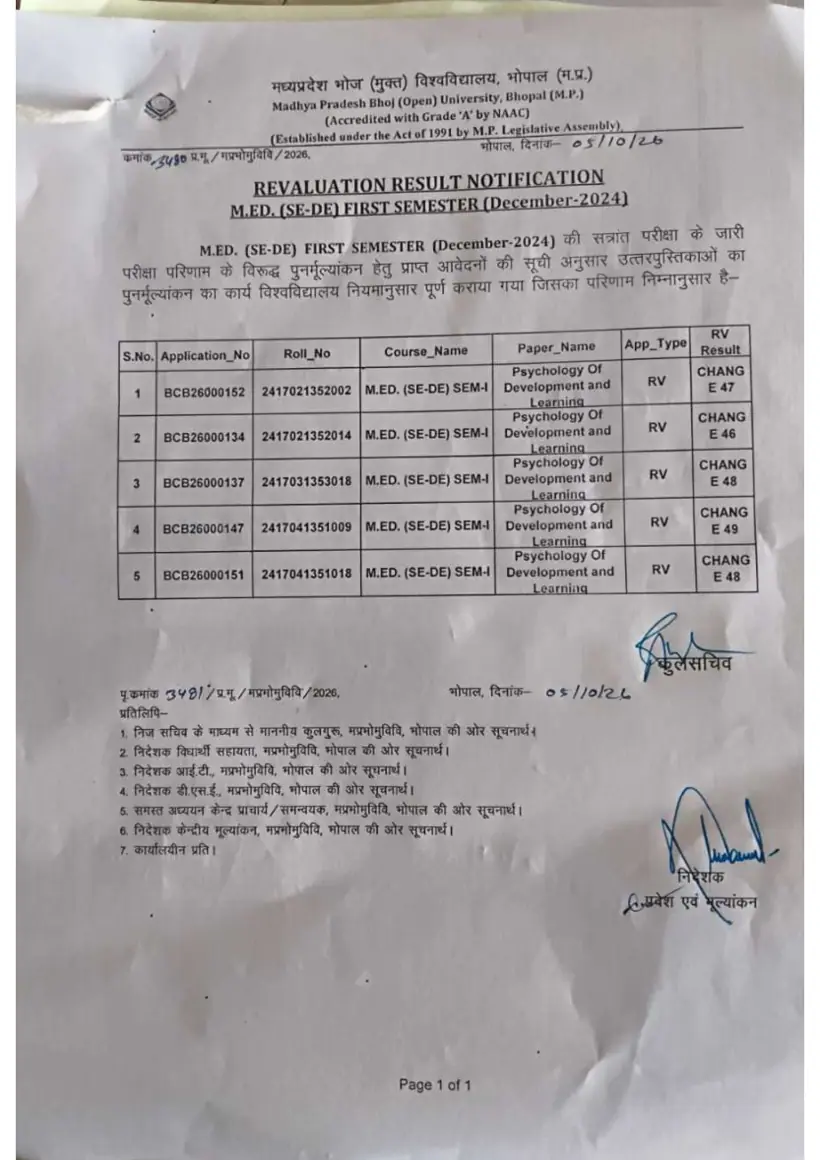
The official notification published by the Director of Admissions & Evaluation and Registrar lists student roll numbers, application numbers, paper names, and updated result statuses for the December-2024 session.
M.Ed. (SE-DE) First Semester Revaluation Scores
| S.No. | Application No. | Roll No. | Course Name | Paper Name | RV Status | Result Status |
|---|---|---|---|---|---|---|
| 1 | BCB26000152 | 2417021352002 | M.ED. (SE-DE) SEM-I | Psychology Of Development and Learning | CHANG | E 47 |
| 2 | BCB26000134 | 2417021352014 | M.ED. (SE-DE) SEM-1 | Psychology Of Development and Learning | CHANG | E 46 |
| 3 | BCB26000137 | 2417031353018 | M.ED. (SE-DE) SEM-1 | Psychology Of Development and Learning | CHANG | E 48 |
| 4 | BCB26000147 | 2417041351009 | M.ED. (SE-DE) SEM-I | Psychology Of Development and Learning | CHANG | E 49 |
| 5 | BCB26000151 | 2417041351018 | M.ED. (SE-DE) SEM-I | Psychology Of Development and Learning | CHANG | E 48 |
How to Download MPBOU Revaluation Result
Students can check their revaluation status on the official website by following these steps:
- Visit the official MPBOU Results Portal.
- Locate ‘REVALUATION RESULT M.ED. (SE-DE) FIRST SEMESTER’ under the Live Result list.
- Click on ‘PDF View Download’ to download the result file.
- Open the document and check your Roll Number, Application Number, and updated paper score.
Other MPBOU services students check
What Students Should Do Next
Candidates can contact university officials or submit online grievances if they require further assistance:
- Submit concerns through the MPBOU Citizen Grievance Portal under the ‘Exam’ category.
- For technical issues on MPOnline, log a ticket through the MPOnline Help Desk Ticket Portal.
- Contact the university at 0755-2492090 or 0755-2492091, or email info@mpbou.edu.in.
- For technical portal assistance, call 0755-6720200.
Useful MPBOU pages
| What you can do | Official page |
|---|---|
| access official MPBOU result page | mpbou.edu.in ↗ |
| submit university grievance form | mpbou.edu.in ↗ |
| raise MPOnline technical ticket | helpdesk.mponline.gov.in ↗ |
MPBOU Notifications and PDFs
- MPBOU M.Ed Special Education Revaluation Result December 2024 PDF — Official MPBOU M.Ed SE-DE 1st Sem Dec 2024 revaluation result notification
MPBOU Questions, Answered
When was the MPBOU M.Ed (SE-DE) First Sem revaluation result declared?
MPBOU declared the M.Ed (SE-DE) First Semester revaluation result for the December-2024 session on October 05, 2026. The official notification was issued under reference number Ref. No. 8510 Pra.Mu./MPBhoMuViv/2026. Students who submitted revaluation applications following the term-end examinations can check their updated status on the MPBOU Results Portal. If you face difficulty opening the notice online, you can call the university administrative helpline at 0755-2492090.
Which paper results are listed in the revaluation notice?
The revaluation notice specifically lists updated scores for the paper titled Psychology Of Development and Learning for M.Ed (SE-DE) First Semester December-2024. The document includes application numbers, roll numbers, course names, paper titles, and revised marks such as E 46 or E 49. Students who applied for revaluation in this course should verify their revised marks directly from the notification table. If your paper details are missing or incorrectly published, submit a query to info@mpbou.edu.in.
Where can students download the revaluation result PDF?
Students can download the revaluation result PDF directly from the official MPBOU Results Portal. To access the file, navigate to the Live Result section, find REVALUATION RESULT M.ED. (SE-DE) FIRST SEMESTER for the December-2024 exam session, and click on PDF View Download. You can then open the downloaded PDF to inspect your application number and roll number. If the portal fails to load the file, contact technical support at 0755-6720200.
How can students submit an examination grievance to MPBOU?
Students can submit an examination grievance online through the official MPBOU Citizen Grievance Portal at mpbou.edu.in/grievance. To lodge a complaint regarding the M.Ed (SE-DE) First Semester December-2024 exam or revaluation, select the Exam category and enter your full name, mobile number, email address, enrollment number, subject, and detailed description before clicking Submit Grievance. If your grievance is not resolved, contact the university office at 0755-2492090 or email info@mpbou.edu.in.
What reference number was issued for the MPBOU M.Ed SE-DE 1st Sem revaluation notice?
MPBOU issued the revaluation result notification under the reference number Ref. No. 8510 Pra.Mu./MPBhoMuViv/2026. Published on October 05, 2026, by the Director of Admissions & Evaluation and Registrar, this official notice covers M.Ed (SE-DE) First Semester December-2024 examinations. Students can reference this official document number when communicating with the university regarding their revaluation marks. If you need further verification of this notification, contact the university office at 0755-2492090.
What details are included in the MPBOU M.Ed SE-DE revaluation result PDF?
The MPBOU revaluation result PDF lists the student application number, roll number, course name, paper name, revaluation status, and updated result status. For the M.Ed (SE-DE) First Semester December-2024 session, it displays status changes alongside revised marks like E 47 or E 48. Students should carefully match their roll number and application ID against the published list to verify score modifications. If any discrepancy appears on the PDF, email details to info@mpbou.edu.in.
How can students report MPOnline portal technical errors for MPBOU services?
Students experiencing technical errors on MPOnline services can lodge an online complaint at the MPOnline Help Desk Ticket Portal. You can raise a ticket by visiting helpdesk.mponline.gov.in/ticket to report application, payment, or technical loading issues related to MPBOU forms. Alternatively, candidates can call the dedicated technical support helpline at 0755-6720200 for immediate technical guidance. If your complaint remains unresolved, contact the MPBOU university administrative office at 0755-2492090.
What is the fee to register on the MPBOU Student Information System (SIS)?
MPBOU charges a portal fee of Rs. 20/- for registering on the Student Information System (SIS). Enrolled students can complete their registration on mpbou.mponline.gov.in by entering their official Enrollment Number and Date of Birth. Registering on SIS allows students to manage their personal database and easily access various online student services. If you face payment or login errors during registration, submit a technical ticket at helpdesk.mponline.gov.in/ticket.
What contact numbers can students use for MPBOU examination inquiries?
Students can call MPBOU university phone numbers 0755-2492090 or 0755-2492091 for official examination and revaluation inquiries. These phone lines assist candidates seeking clarification on M.Ed (SE-DE) First Semester December-2024 revaluation notifications or administrative matters. For technical errors encountered on online portals, students must instead dial the technical support helpline at 0755-6720200. If telephone lines are busy, send your detailed query via email to info@mpbou.edu.in.
Which email addresses can students use to contact MPBOU regarding academic and admission issues?
Students can contact MPBOU regarding university queries by emailing info@mpbou.edu.in or admission.mpbou@gmail.com. These email channels handle academic concerns, admission verification, and examination result follow-ups for courses including M.Ed (SE-DE) First Semester. When sending an email, include your full name, enrollment number, and specific issue details to ensure prompt processing by university officials. If you do not receive a response, log an online grievance at mpbou.edu.in/grievance.
How can students report MPOnline payment and technical failures for MPBOU services?
Students can report payment failures or technical issues by submitting a ticket on the MPOnline Help Desk portal at helpdesk.mponline.gov.in/ticket. Select BHOJ under the service category, choose your complaint type such as Payment Failure or Technical, fill in your contact details, and enter your reference transaction ID. Once submitted, candidates can log in to track ticket resolution status. If the payment issue persists, candidates can call the technical helpline at 0755-6720200 for immediate assistance.
Which email address handles official registrar communications for MPBOU notifications?
Students and study centers can contact the MPBOU Registrar Office directly by emailing registraroffice.mpbou@gmail.com for official university notifications and administrative clarifications. This official contact is used alongside general helpline channels for examination verification and document queries regarding sessions like M.Ed (SE-DE). When submitting queries, include your enrollment number, course name, and specific issue details. If you require urgent administrative help, call the university helpline at 0755-2492090.
How can MPBOU students download online payment receipts on mobile devices?
Enrolled MPBOU students can obtain online receipts by downloading the official MPOnline App from the Google Play Store. Within the mobile application, select the MP Mobile section and tap on the University link to view and retrieve your payment receipts. This feature enables candidates to access fee receipts and transaction records directly from their smartphones. If you experience technical errors while downloading receipts, raise a support ticket at helpdesk.mponline.gov.in/ticket.
How does MPBOU issue enrollment numbers to newly admitted students?
MPBOU generates official enrollment numbers and roll numbers for students whose documents satisfy eligibility criteria, sending these details directly via SMS. If a candidate fails to meet eligibility requirements, the university cancels the admission application form, making the student responsible. Regional and study centers are required to verify student eligibility before granting online approval for admission forms. For queries regarding admission cancellation or pending enrollment numbers, students should email admission.mpbou@gmail.com.