
MPBOU Bhoj University Student Login: SIS Portal and Online Services
Part of MPBOU Student Services: MPBOU Bhoj University Result Marksheet: Online Application
- MPBOU students use the MPOnline portal for all online services.
- The Student Information System (SIS) requires enrolment number and date of birth for registration.
- SIS registration costs Rs. 20/- for enrolled MPBOU students.
- Students can link their ABC ID through a dedicated MPOnline portal page.
- Technical support for MPOnline services is available at 0755-6720200.
At a glance
| University Official Portal | mpbou.edu.in |
|---|---|
| MPOnline Services Portal | mpbou.mponline.gov.in |
| SIS Registration Fee | Rs. 20/- |
| Technical Helpdesk Phone | 0755-6720200 |
| University Administrative Phone | 0755-2492090 |
| University Email (Admissions) | admission.mpbou@gmail.com |
| Grievance Portal | mpbou.edu.in/grievance |
Madhya Pradesh Bhoj (Open) University (MPBOU), also known as Bhoj University, provides various online services to its distance learners through the MPOnline portal. Students can access their academic information, apply for documents, and manage their profiles via the Student Information System (SIS). This system requires an enrolment number and date of birth for registration, with a nominal portal fee.
MPBOU Student Login: Overview of Student Information System (SIS)
MPBOU provides the Student Information System (SIS) for all its enrolled students to manage their academic records and access various services. This system allows students to create their own database and avail all kinds of facilities online. Access to SIS requires prior registration on the MPOnline portal.
The SIS facility is specifically designed for students who are already enrolled with Madhya Pradesh Bhoj (Open) University. It serves as a central hub for personal academic data and self-service options. Students must complete a one-time registration to gain access to these features. Upon successful registration, students will receive their enrolment or roll number via SMS if eligible; otherwise, admission forms may be cancelled.
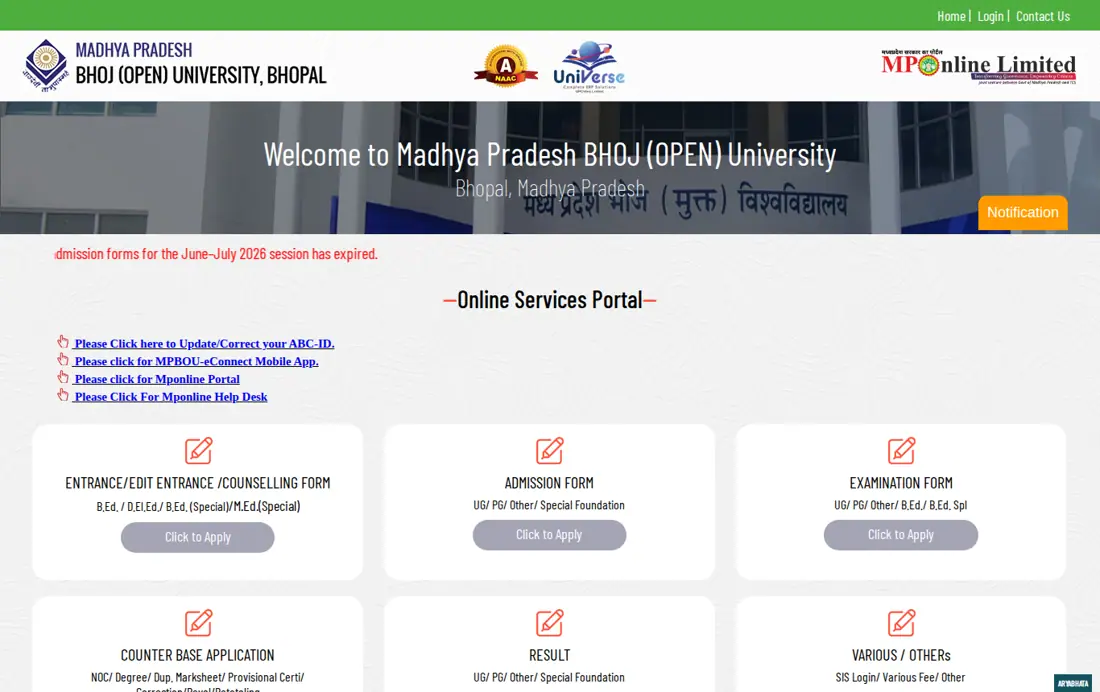
MPBOU Student Information System (SIS): Registration Steps
To register for the MPBOU Student Information System (SIS), students must have their Enrollment Number and Date of Birth ready. A portal fee of Rs. 20/- is required to complete the registration process. This one-time registration enables access to personal academic databases and various online facilities.
Students can complete their SIS registration through the official MPOnline portal dedicated to MPBOU services. Ensure all details are entered accurately to avoid any issues with accessing the system. The registration fee must be paid online during the process.
- Navigate to the MPBOU MPOnline portal.
- Locate the “STUDENT INFORMATION SYSTEM (SIS)” section on the portal.
- Initiate the registration process by providing your Enrollment Number and Date of Birth in the required fields.
- Proceed to pay the required portal fee of Rs. 20/- to complete your SIS registration.
MPBOU Student Information System (SIS): Available Services
After successfully registering and logging into the MPBOU Student Information System (SIS), enrolled students can access a range of self-service features. These services allow students to manage their academic journey efficiently from a single platform. Students can apply for various official documents directly through their SIS dashboard.
The SIS portal enables students to apply online for their Degree/Diploma, Migration, and Provisional certificates. This streamlines the process of obtaining essential academic documents without needing to visit the university in person. The system also facilitates access to personal academic databases.
- Online application for Degree/Diploma certificates
- Online application for Migration certificates
- Online application for Provisional certificates
- Access to personal academic database
Other MPBOU services students check
MPBOU Student Login: Password Recovery for Helpdesk
Students who have forgotten their login credentials for the MPOnline helpdesk can recover their password through an OTP verification process. This ensures secure access to their accounts and allows them to submit new complaints or track existing ones. The recovery process requires the registered mobile number.
To reset a forgotten password, students should visit the MPOnline helpdesk login page and opt for the OTP verification method. This method sends a one-time password to the mobile number associated with the account. Students can then use this OTP to regain access.
- Go to the MPOnline helpdesk OTP login page.
- Enter your registered mobile number in the designated field.
- Complete the Captcha verification as displayed on the screen.
- Click on “Generate OTP” to receive a one-time password on your mobile.
- Enter the received OTP to verify your identity and proceed with password recovery.
MPBOU Helpdesk Login: Existing Users
Existing users of the MPOnline Helpdesk can log in using their username or mobile number and password. This login allows students to access their previously submitted complaints and track their resolution status. A captcha verification step is included to ensure security.
If a student has an existing helpdesk account, they can use the standard login page. In case of a forgotten password, the OTP-based recovery method is available. This portal is distinct from the main SIS login but is essential for support queries.
- User Name or Mobile Number
- Password
- Captcha Verification
- Navigate to the MPOnline Helpdesk login page.
- Enter your User Name or Mobile Number in the first field.
- Input your Password in the designated password field.
- Complete the Captcha verification displayed on the screen.
- Click the “Login” button to access your helpdesk account.
MPBOU ABC ID: Linking and Verification
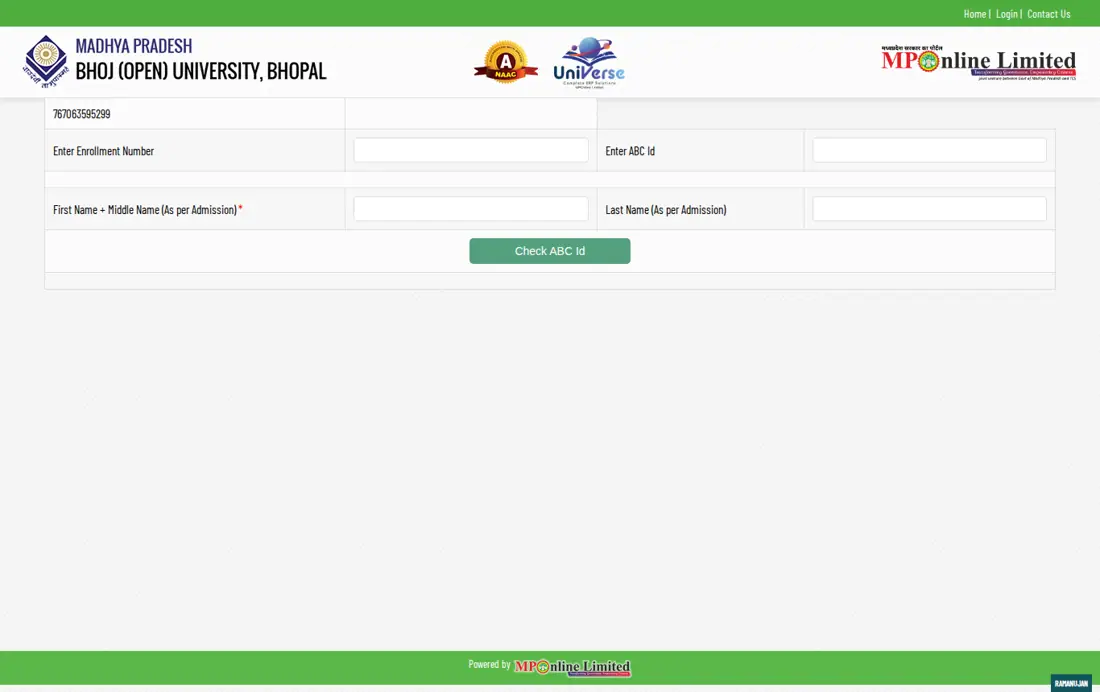
MPBOU students can link and update their Academic Bank of Credits (ABC ID) through a dedicated portal on MPOnline. This process is crucial for integrating academic achievements with the national ABC system. Students need their enrolment number and ABC ID, along with their name as per admission records.
The ABC ID insertion page requires specific details to ensure accurate linking of the student’s profile. Students must provide their first name, middle name (if applicable), and last name exactly as they appear in their admission records. This ensures proper verification and update of the ABC ID.
- Enrollment Number
- ABC Id
- First Name + Middle Name (As per Admission)
- Last Name (As per Admission)
- Access the ABC ID Insertion page on the MPOnline portal.
- Enter your Enrollment Number in the first field.
- Provide your ABC Id in the corresponding field.
- Enter your First Name and Middle Name exactly as per your admission records.
- Input your Last Name as it appears in your admission documents.
- Click the “Check ABC Id” button to initiate the linking and verification process.
MPBOU MPOnline Portal: General Services
The `mpbou.mponline.gov.in` portal serves as the central hub for all online services offered by Madhya Pradesh Bhoj (Open) University. Students can use this portal for various academic and administrative tasks, including accessing forms and notifications. It is the primary platform for digital interactions with the university.
This portal provides access to online forms as per university notifications and facilitates the generation of enrolment/roll numbers for eligible students. The portal also offers a helpdesk for technical issues.
MPBOU Helpdesk: Contact Information
For technical issues related to the MPOnline portal, payment failures, or application problems, students can contact the MPOnline Helpdesk. This dedicated support channel assists with digital service difficulties. The helpdesk can be reached via phone or by submitting a complaint online.
Students facing technical problems should call 0755-6720200 for immediate assistance. For other administrative queries, the university can be contacted at 0755-2492090. An online grievance system is also available for detailed issue submission.
MPBOU and MPOnline Helpdesk Contact Details
| Service Type | Contact Detail | Source |
|---|---|---|
| MPOnline Technical Issues | 0755-6720200 | 8 |
| University Administrative Queries | 0755-2492090 | 8, 12 |
| University Administrative Queries | 0755-2492091 | 12 |
| University Fax | 0755-2424640 | 1 |
| University Email (Admissions) | admission.mpbou@gmail.com | 8 |
| University Email (Registrar Office) | registraroffice.mpbou@gmail.com | 1 |
| University Email (General Info) | info@mpbou.edu.in | 12 |
MPBOU Grievance Redressal: Submitting a Concern
Madhya Pradesh Bhoj (Open) University offers an online grievance portal for students and citizens to submit their concerns directly to the Grievance Redressal Cell. This system allows for formal submission and tracking of issues related to academic, infrastructure, or examination matters. An enrolment number is optional for citizens but can be provided by students.
To submit a grievance, individuals must fill out a form with their personal details and a description of the issue. The portal ensures that all concerns are directed to the appropriate university department for resolution. Students can also track the status of their submitted grievances online.
- Full Name
- Address (optional)
- Email Address
- Mobile Number
- Enrollment Number (optional — for students)
- Grievance Category (Academic, Infra, Exam, Other)
- Grievance Subject/Issue
- Description (max 1000 characters)
- Visit the MPBOU Grievance portal.
- Fill in your Full Name, Email Address, and Mobile Number in the respective fields.
- Optionally, provide your Address and Enrollment Number if you are a student, as this is helpful for student-specific issues.
- Select the appropriate Grievance Category from the dropdown options (Academic, Infra, Exam, or Other).
- Enter a concise Grievance Subject/Issue in the dedicated field.
- Provide a detailed Description of your concern, limited to 1000 characters.
- Complete the Captcha verification displayed on the screen.
- Click “Submit Grievance” to register your complaint with the university.
MPBOU Mobile App: Accessing Online Receipts
Students of Madhya Pradesh Bhoj (Open) University can download the MPOnline App from the Google Play Store to access all types of online receipts. This mobile application provides a convenient way to retrieve payment confirmations and other digital documents. The app simplifies the process of managing financial records.
After downloading the MPOnline App, students need to select “MP Mobile” and then choose the “University” link to access their receipts. This feature ensures that students have easy access to their transaction history and official university receipts on their mobile devices.
Useful MPBOU pages
| What you can do | Official page |
|---|---|
| MPBOU MPOnline portal | mpbou.mponline.gov.in ↗ |
| ABC ID Insertion page | mpbou.mponline.gov.in ↗ |
| MPOnline helpdesk OTP login page | helpdesk.mponline.gov.in ↗ |
| MPOnline Helpdesk login page | helpdesk.mponline.gov.in ↗ |
| MPBOU Grievance portal | mpbou.edu.in ↗ |
| MPOnline Help Desk | helpdesk.mponline.gov.in ↗ |
| MPOnline Helpdesk ticket submission | helpdesk.mponline.gov.in ↗ |
Questions about MPBOU Bhoj University Student Login
How can MPBOU students log in to their academic portal?
MPBOU students can log in to their academic portal through the Student Information System (SIS) available on the MPBOU MPOnline portal. This system requires prior registration using their Enrollment Number and Date of Birth. A portal fee of Rs. 20/- is applicable for SIS registration.
What is the fee for MPBOU SIS registration?
The registration fee for the MPBOU Student Information System (SIS) is Rs. 20/-. This one-time payment allows enrolled students to create their personal database and access various online facilities. The fee is paid during the online registration process.
What details are needed to register for MPBOU SIS?
To register for the MPBOU Student Information System (SIS), students must provide their Enrollment Number and Date of Birth. These details are essential for verifying student identity and creating their academic profile. The registration is completed on the MPOnline portal.
How can I link my ABC ID with MPBOU?
You can link your ABC ID with MPBOU by visiting the ABC ID Insertion page on the MPOnline portal. You will need to enter your Enrollment Number, ABC ID, First Name + Middle Name, and Last Name exactly as per your admission records. This ensures accurate verification.
What services are available after logging into MPBOU SIS?
After logging into MPBOU SIS, students can apply online for Degree/Diploma, Migration, and Provisional certificates. The system also provides access to their personal academic database. These features streamline the process of obtaining essential academic documents.
How do I contact MPBOU for technical issues with the MPOnline portal?
For technical issues related to the MPOnline portal, such as payment failures or application problems, you can contact the MPOnline Helpdesk at 0755-6720200. For administrative questions, the university can be reached at 0755-2492090.
Where can I find my MPBOU online receipts?
You can find your MPBOU online receipts by downloading the MPOnline App from the Google Play Store. After installing, select “MP Mobile” and then the “University” link to access all types of your online receipts. This provides convenient access to your payment records.
What is the fee and process for changing an MPBOU study centre online?
The fee for an MPBOU study centre transfer is Rs. 500/- payable online through the MPOnline portal. Admitted students must submit their applications online during the specified notification window, such as 12 August to 25 August 2026. Transfers are granted subject to seat availability and are non-refundable.
What is the application fee for the MPBOU B.Ed. Special Education entrance exam?
The application fee for the MPBOU B.Ed. (Special Education) entrance examination is Rs. 800/- plus Rs. 50/- MPOnline portal charges. If submitting during the extended late fee window, an additional late fee of Rs. 300/- applies. Applications must be submitted online through the MPOnline portal.
In this section
- MPBOU Bhoj University Result Marksheet: Online Application
- MPBOU MP Bhoj Degree Apply Query and Migration Certificate Helpdesk 2026
- MPBOU Name Correction Form, Study Centre Change & Profile Rules
MPBOU Bhoj University Student Login: official portals and documents
- MPBOU B.Ed Special Education First Year Academic Calendar 2026-29 PDF — MPBOU B.Ed Special Education First Year Academic Calendar 2026-29